Yeedu
Service Account Key Rotation Documentation
Service Account and Required Permissions
The GCP service account is critical for Yeedu platform and is used to perform several infrastructure and operational tasks within the Google Cloud environment.
The service account is primarily responsible for deploying and managing the Yeedu Control Plane. In addition, when a Spark job is submitted, the service account is responsible for provisioning and spinning up new Spark VMs on demand to execute the workload. This enables Yeedu to dynamically provision the required compute resources based on the submitted Spark jobs.
The service account is also responsible for collecting and pushing cluster-level, job-level logs and container-level logs to the configured Google Cloud Storage (GCS) bucket. This allows the platform to centrally store and retain logs for monitoring, troubleshooting, auditing, and operational analysis.
To perform these operations successfully, the Yeedu service account requires the following Google Cloud IAM roles:
- Compute Engine Admin – Required to create, configure, manage, and terminate Spark VMs and other compute resources dynamically.
- VPC Reader – Required to access and read VPC and network configuration details needed for provisioning and managing Spark workloads.
- GCR Reader – Required to pull container images from Google Container Registry (GCR) when deploying Yeedu components and running containerized workloads.
- Storage Object Admin – Required to upload, manage, and maintain cluster and container logs in the configured GCS bucket.
- Permission to read base images (Cleardata Images in our case) for spinning up Virtual Machines.
These permissions enable the Yeedu platform to automate the deployment and management of its control plane, dynamically provision Spark compute resources, retrieve the required container images, and reliably publish operational logs to the customer-configured GCS bucket.
The service account should be granted these permissions in accordance with the customer’s Google Cloud IAM policies and security requirements.
Policy trigger: Humana security policy mandates GCP service account JSON key rotation every 90 days. Failure to rotate causes cascading failures across the Yeedu platform.
1. Impact of Expired Credentials:
When the service account expires, its impact can be seen at both the tenant level and the system level.
- At the system level, the logs, Spark binaries, and startup scripts sync into the Spark VMs fail.
- At the tenant level, the expired credentials will result
- in issues with cluster provisioning where the clusters provisioning fails with credentials expired, invalid_grant issue.
- Users will not be able to upload files/artifacts to Yeedu dependency repositories which will result in missing dependencies in the spark VM’s.
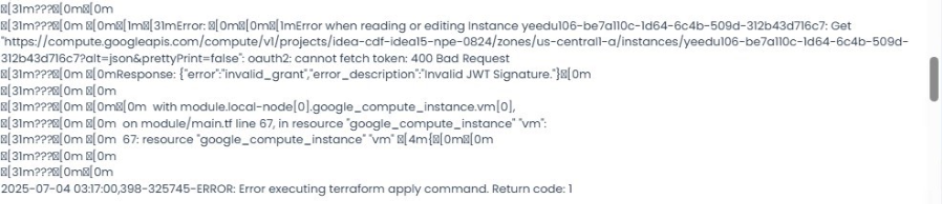
Failure | Symptom | Root Cause |
New Spark VMs cannot be created and running spark VM’s cannot be stopped/destroyed | Cluster creation errors out and cluster destroy errors out | Yeedu control plane cannot authenticate to GCP to manage compute |
Running jobs may fail mid-execution | Spark VMs unable to sync JARs and dependencies | Credentials configured for Dependency Repository are expired. Jobs dependent on artifacts from Dependency repositories will fail. |
Jobs & notebooks stuck in "Submitted" | Workloads never transition to "Running" | Startup scripts, Docker images, and Spark binaries cannot be pulled; hence clusters do not complete bootstrap. |
Logs Synchronization fails in Yeedu | Cluster logs and job logs are not visible in Yeedu UI | Yeedu Backend services cannot authenticate to the cloud buckets to push / pull logs. |
2. Rotation Checklist
Once the credentials are rotated/once you get the new credentials, they must be updated in the following locations respectively.
- Yeedu Core Services at System level.
- Cluster credentials at Tenant level.
- Dependency Repository credentials at Tenant level.
2.1 Yeedu Core Services — Restart with New Credentials
Purpose: Core services use the service account to pull Spark binaries into Spark cluster VMs, fetch startup scripts from google object storage, sync logs to GCP Stack Driver and pull required Docker images.
Prerequisite:
- All the clusters need to be in stopped state before restarting yeedu core services.
- If jobs from Nabu are scheduled, stop the jobs from the Nabu. This ensures that no jobs are dispatched to yeedu, hence preventing automatic cluster provisioning in Yeedu.
- If the clusters are in error state, update the credentials and stop the clusters. Refer Section 2.2 on how to update the credentials.
Steps:
1. Obtain the newly generated service account JSON key from the GCP IAM console (or from the team that manages key issuance).
2. Replacing service accounts json in Yeedu Core-Services-Formation (This is inside the VM for Yeedu Core Services are deployed)
Navigate to the path where Core-Services-Formation directory is cloned. Ex “/opt/yeedu-software/Core-Services-Formation"
Cmd : cd /opt/yeedu/Core-Services-Formation/
In the file yeedu-system-config.properties, please find the below paths
1. YEEDU_SYSTEM_CLOUD_CREDENTIALS_FILE_PATH
2. YEEDU_SYSTEM_DOCKER_REGISTRY_CREDENTIALS_FILE_PATH
Cmd : cat yeedu-system-config.properties | grep –i CREDENTIALS_FILE_PATH

Update the service account JSON in the credentials.json file.
3. Restart Yeedu Core-Services-Formation by running ./yeedu-core-services.sh restart command
Cmd : ./yeedu-core-services.sh restart

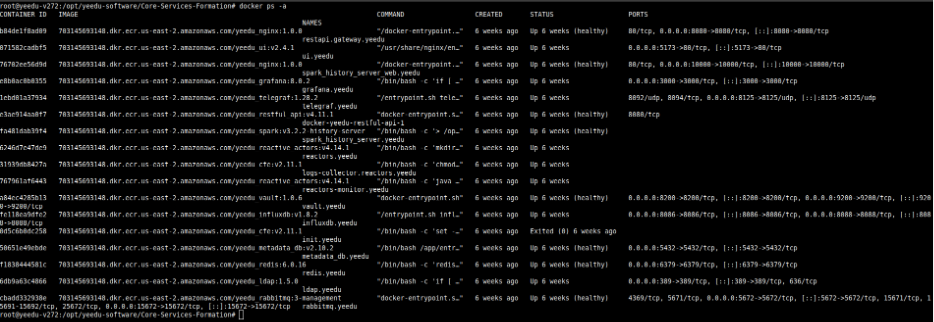
4. Verify the services are healthy by using the below command:
Cmd : docker ps -a
5, Once the services are healthy, refer to the YEEDU RESTART DOCUMENTATION and apply the respective patches,
6. Once done, Open Yeedu UI and check if you can fetch any Cluster/Job Log. (Cluster -> Any Cluster -> Logs -> Stdout/Stderr -> You should be able to see the log)
2.2. Yeedu Cluster Credentials — Replace in Yeedu UI
Purpose: The Yeedu control plane uses these credentials to spin up/down and manage GCP VMs for Spark clusters. Without valid credentials here, Yeedu will not have control our Computes on GCP.
Note:
- Ensure that the clusters are in stopped state before updating service account Json in yeedu UI.
- User can’t edit the credentials if a cluster is in running state.
- For an errored cluster, locate and update the cluster credential, then stop and restart the cluster.
Steps:
1. Log in to the Yeedu UI with an admin account.
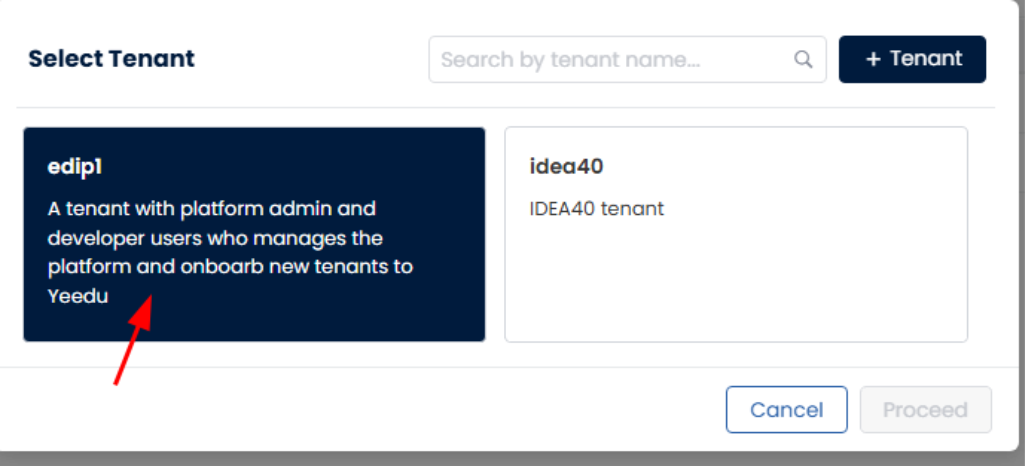
2. Select the appropriate tenant.
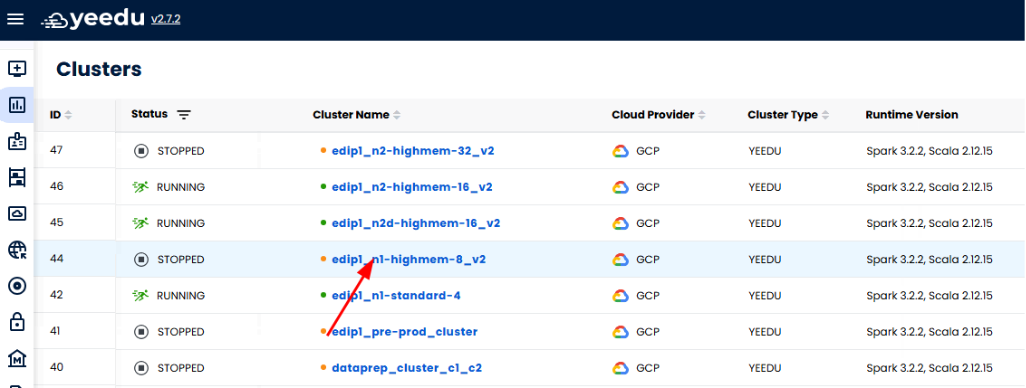
2. Navigate to the clusters and note down the credential config used to spin up clusters by checking the cluster config page from Yeedu UI.
- Navigate to the Clusters Tab
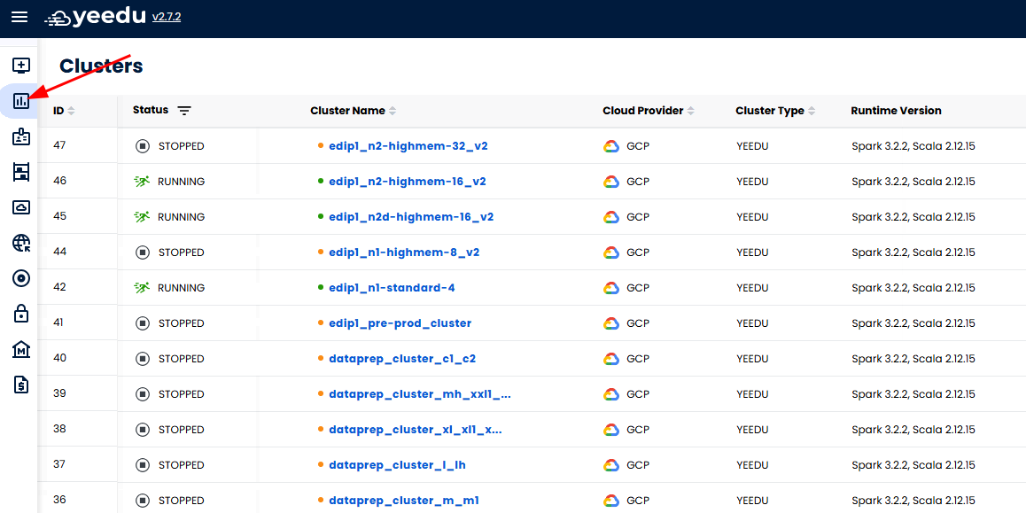
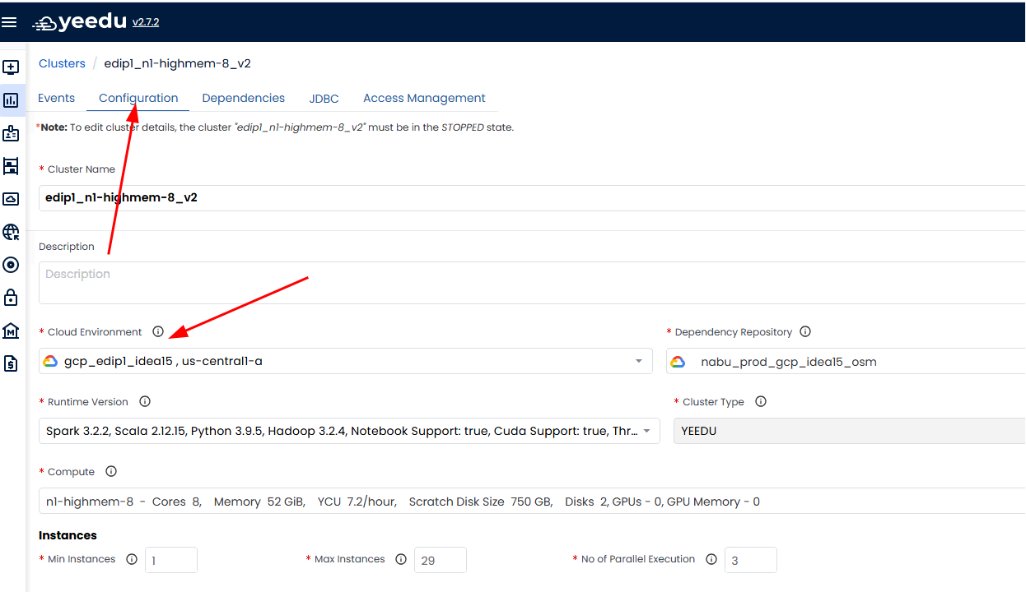
- Click on any cluster and navigate to the cluster configuration page.
- Click on configuration tab and check Cloud Environment details
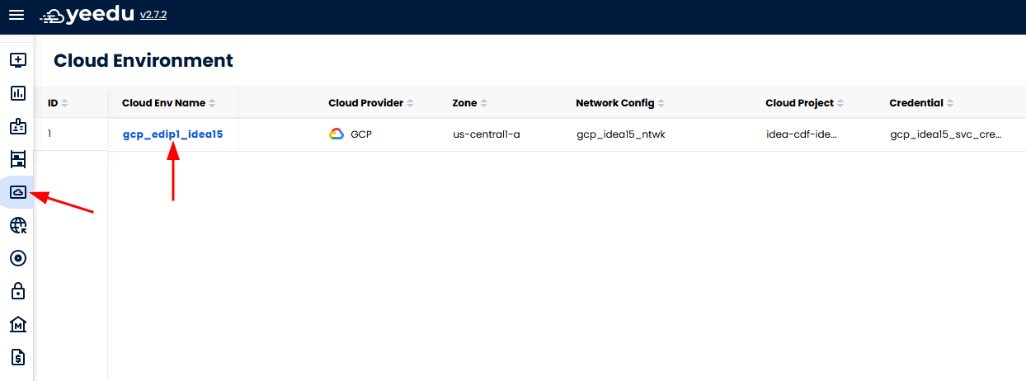
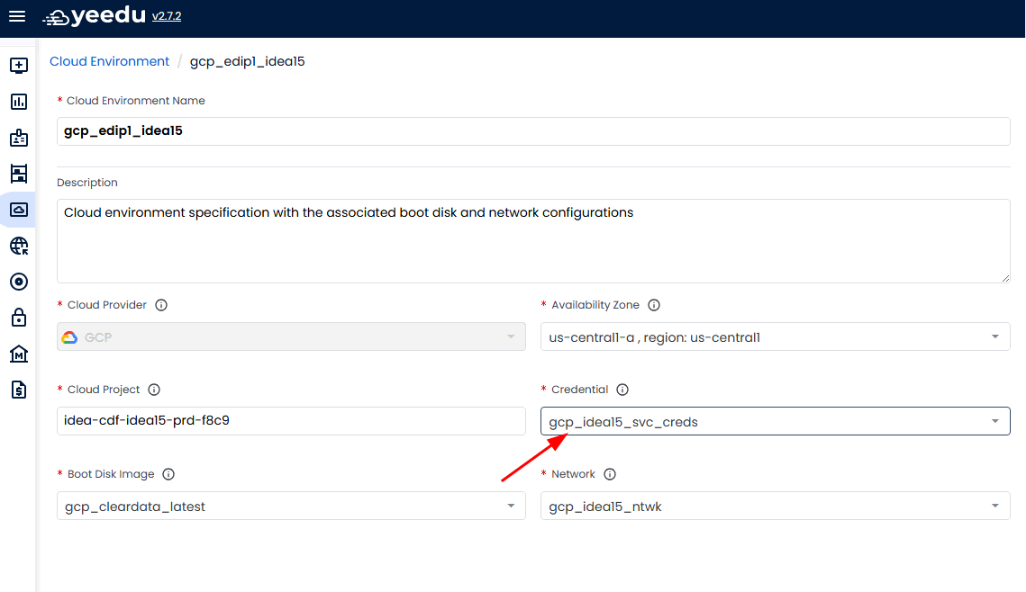
- Navigate to the Cloud Environment page. Click on the Cloud Environment to see the configuration.
- Note down the name of credential config being used by the cluster. We need to update the credentials in this config id with the new service account Json.
3. Navigate to the Credentials tab.
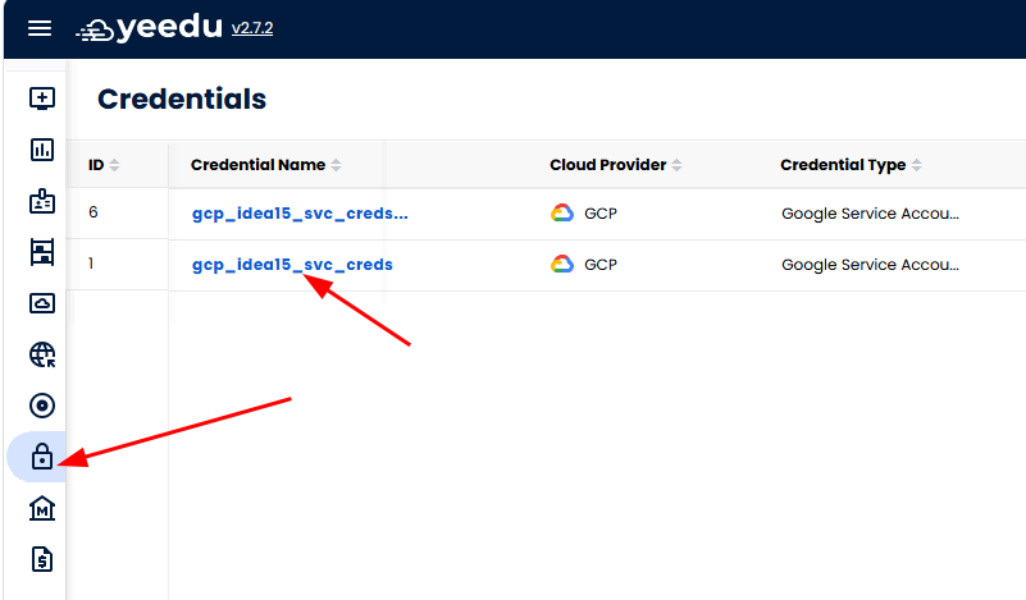
4. Edit the credential configuration. Replace the old service account json with the new one and click on update.
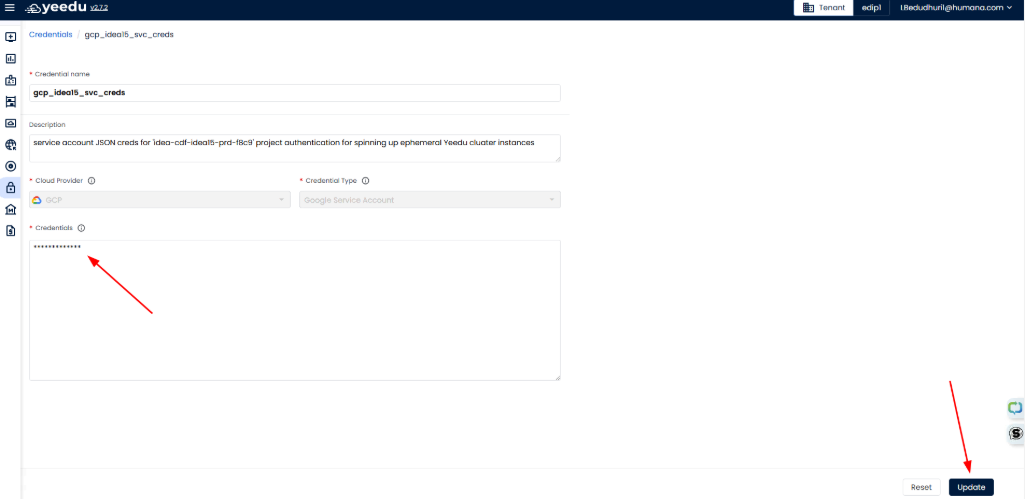
5. Service account Json is successfully updated. Now start the respective Cluster from Yeedu UI and you should be able to see the cluster going to RUNNING state. If it ERRORS out, please check the Yeedu Cluster Logs and check if you are still facing the same issue.
2.3 Yeedu Dependency repository — Replace Credentials
Purpose: The Dependency repository uses the service account to create and manage Dependency Repositories. When credentials expire, JAR files and other dependencies can no longer be synced to Spark VMs.
Steps:
1. Check the dependency repository being used by the cluster. Navigate to the Dependency Repositories tab.
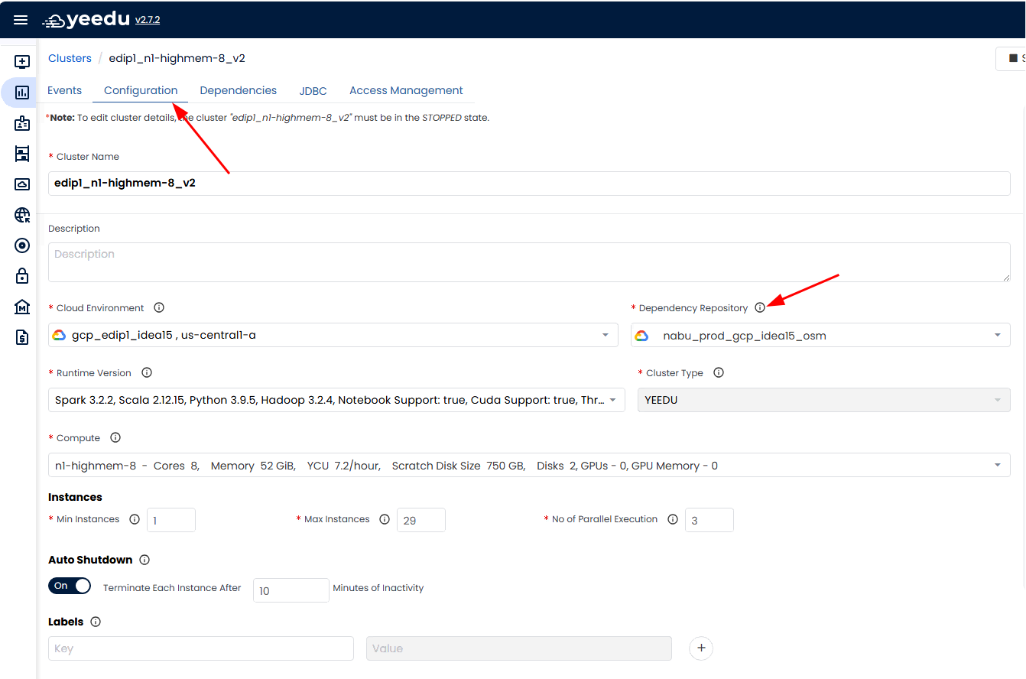
2. Open the config page of the dependency repository. Note down the credential config name being used.
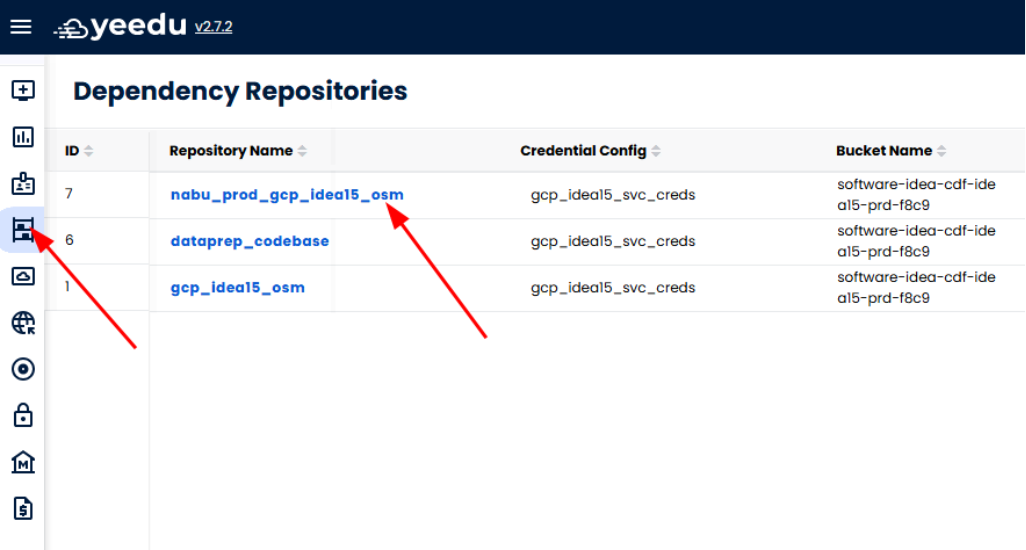
- Note down the credential config name being used by dependency repository.
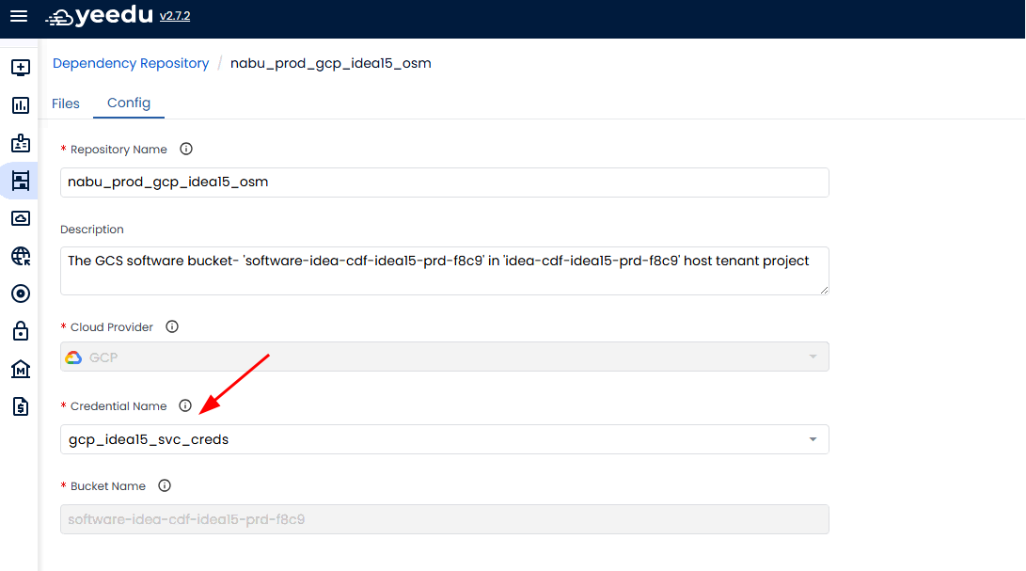
3. Replace the expired service account JSON key with the new key by navigating to the Credentials tab 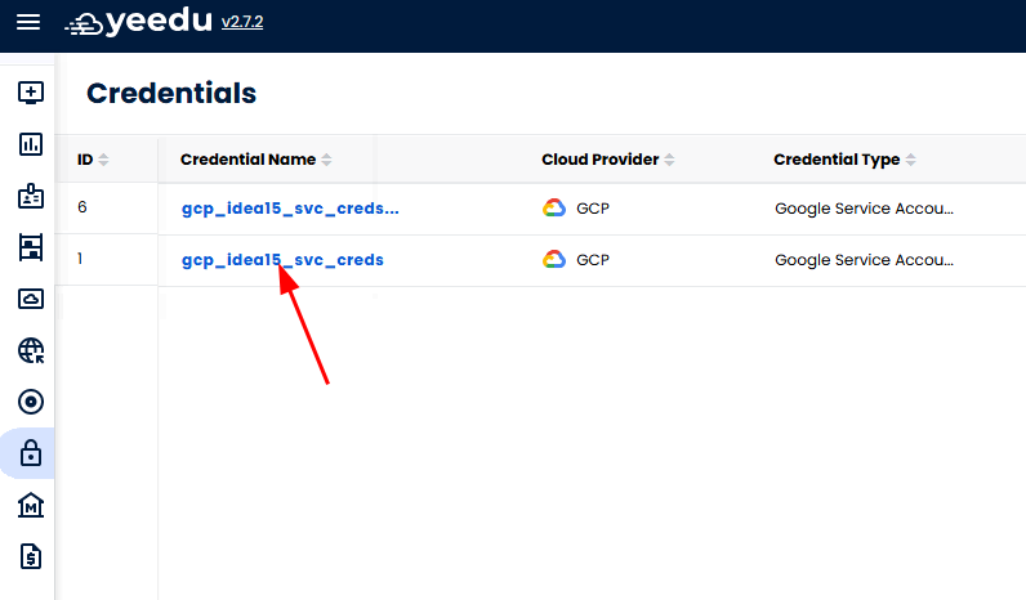
4. Update the credentials and click on update to save the changes.
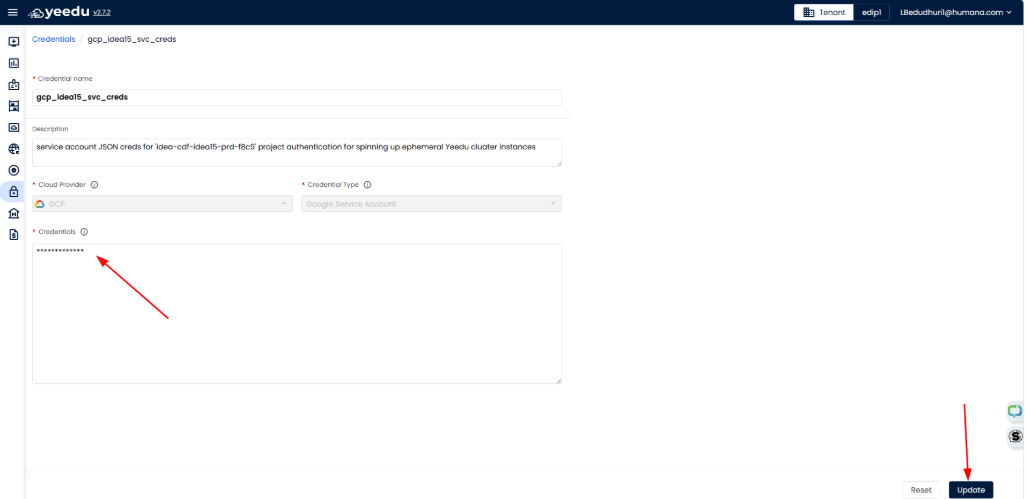
5. The dependency repository credentials are successfully updated.
3. Post-Rotation Validation:
After updating all three locations, run through the following checks before closing the maintenance window:
System Level Refresh Validations:
Core services healthy — All Yeedu services are running. - Yeedu UI accessible.
Tenant Level Refresh Validations:
New cluster creation works — Start a cluster and check if it transitions into running state.
Run a Sample Job — Run a sample job to verify the cluster bootstraps successfully.
Dependency sync works — Able to upload a sample file to the Dependency Repository.
Was this article helpful?
That’s Great!
Thank you for your feedback
Sorry! We couldn't be helpful
Thank you for your feedback
Feedback sent
We appreciate your effort and will try to fix the article